From Manual Entry to AI-Powered Expense Management
Summary
Streamline receipt capture and expense tracking to reduce manual effort and improve accuracy across user roles
Client
Rent Manager (London Computer Systems)
Role
UX Designer
Skills
UX Design
Interaction Design
Cross-Platform Experience Design
The Challenge
Background
Rent Manager is a property management platform that includes accounting tools for tracking company expenses. Users frequently handle high volumes of receipts—from maintenance purchases to team expenses and reimbursements.
Objective
Reduce manual effort in managing company transactions and reimbursements by designing an AI-enhanced receipt processing experience.
Before this feature, receipt management was entirely manual.
Key Problems
- Time-consuming, error-prone data entry
- Inefficient expense tracking workflows
- Lost receipts leading to delayed or missing reimbursements
Opportunity
Create a centralized, intuitive system for capturing, processing, and managing receipts—while leveraging AI to reduce user effort.
Goals
- Introduce a dedicated receipt management feature across web and mobile
- Use AI to extract receipt data and minimize manual input
- Enable fast, accurate transaction processing
- Support multiple user roles with distinct needs
Understanding the Users
To ensure the solution fit into real workflows, I conducted user interviews focused on how receipts are currently handled across roles.
Key Users

Expense Manager
Oversees expenses
Needs
- Clear visibility into transactions
- Confidence in accuracy
- Efficient review workflows

Field Technician
Captures receipts on the go
Needs
- Fast, reliable receipt capture
- Minimal friction while working in the field
- Avoid losing receipts

Administrator
Records transactions
Needs
- Streamlined data entry
- Organized, accessible receipts
- Efficient tools to support multiple team members
Key Insight
Receipt management isn’t just a single task—it’s a multi-step workflow across multiple users. This revealed a specific design need.
The experience had to support both quick capture in the field and efficient processing in the office, without creating extra work at either stage.
Design Approach
I broke the experience into two core workflows:
- Scan & Upload Receipts (Mobile-first)
- Review Receipts & Create Transactions (Web-focused)
This allowed me to design for different contexts while maintaining a connected system.
Designing Receipt Capture (Mobile)
The first challenge was simplifying how users capture receipts in real time. The image capture process we needed to explore had three distinct steps.
Capture single or multiple images
→
Group images into one receipt
→
Decide what to keep, retake, or discard
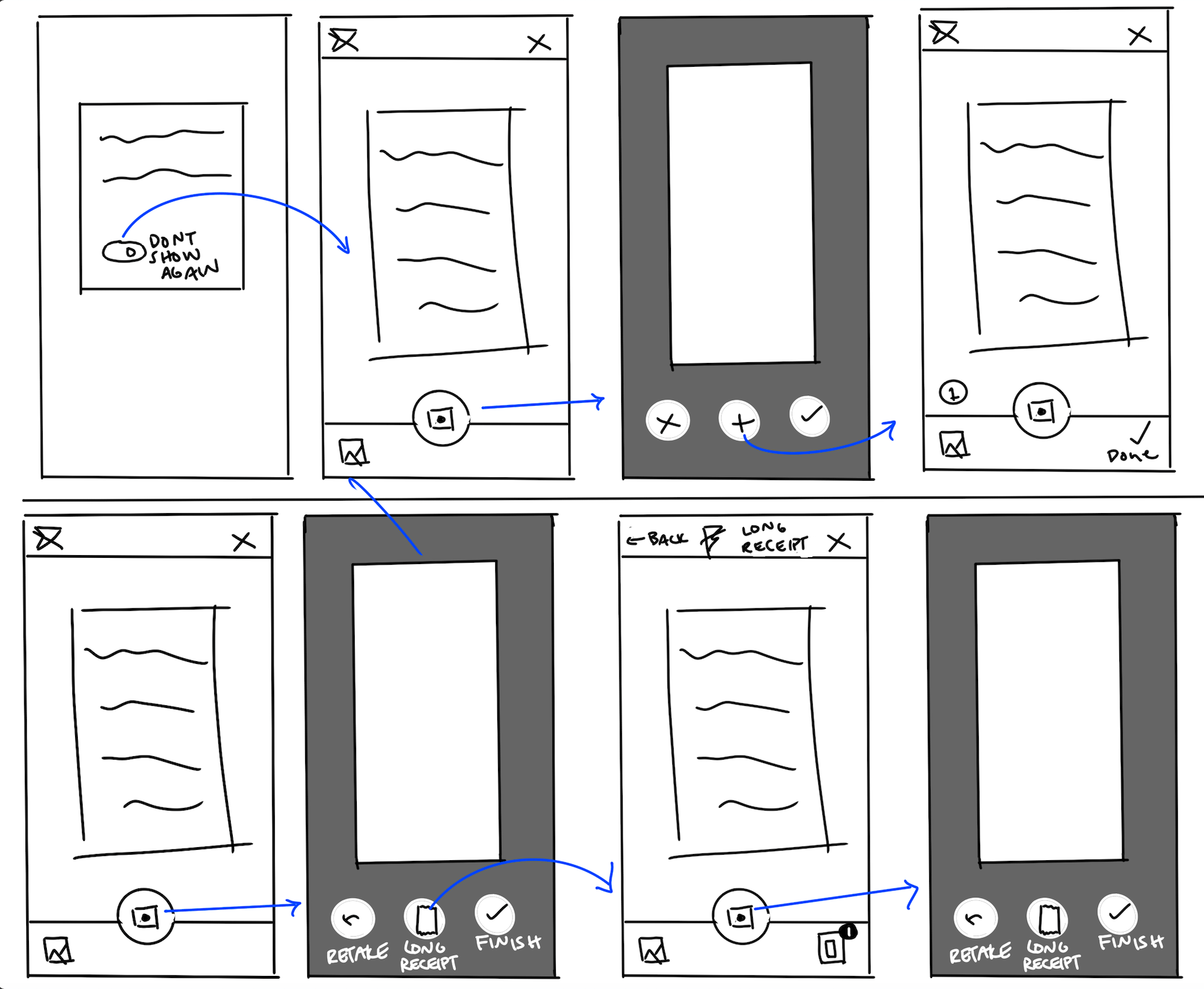
Iteration on this small but crucial step of the experience started with wireframing. Refining this process included screens for a clear flow for capturing and confirming receipt images, the ability to combine multiple images into a single receipt, and lightweight data input to complement AI extraction
Result
A fast, flexible capture experience that works in real-world conditions (in-store, on the move).
Designing Review & Transaction Creation (Web)
The second phase focused on how receipts are processed and turned into transactions.
There were three main design challenges.
Display of multiple images per receipt
→
Group receipts into one transaction
→
Balance dense information with clarity
I iterated on receipt preview layouts, transaction grouping logic, and data visibility and editability.
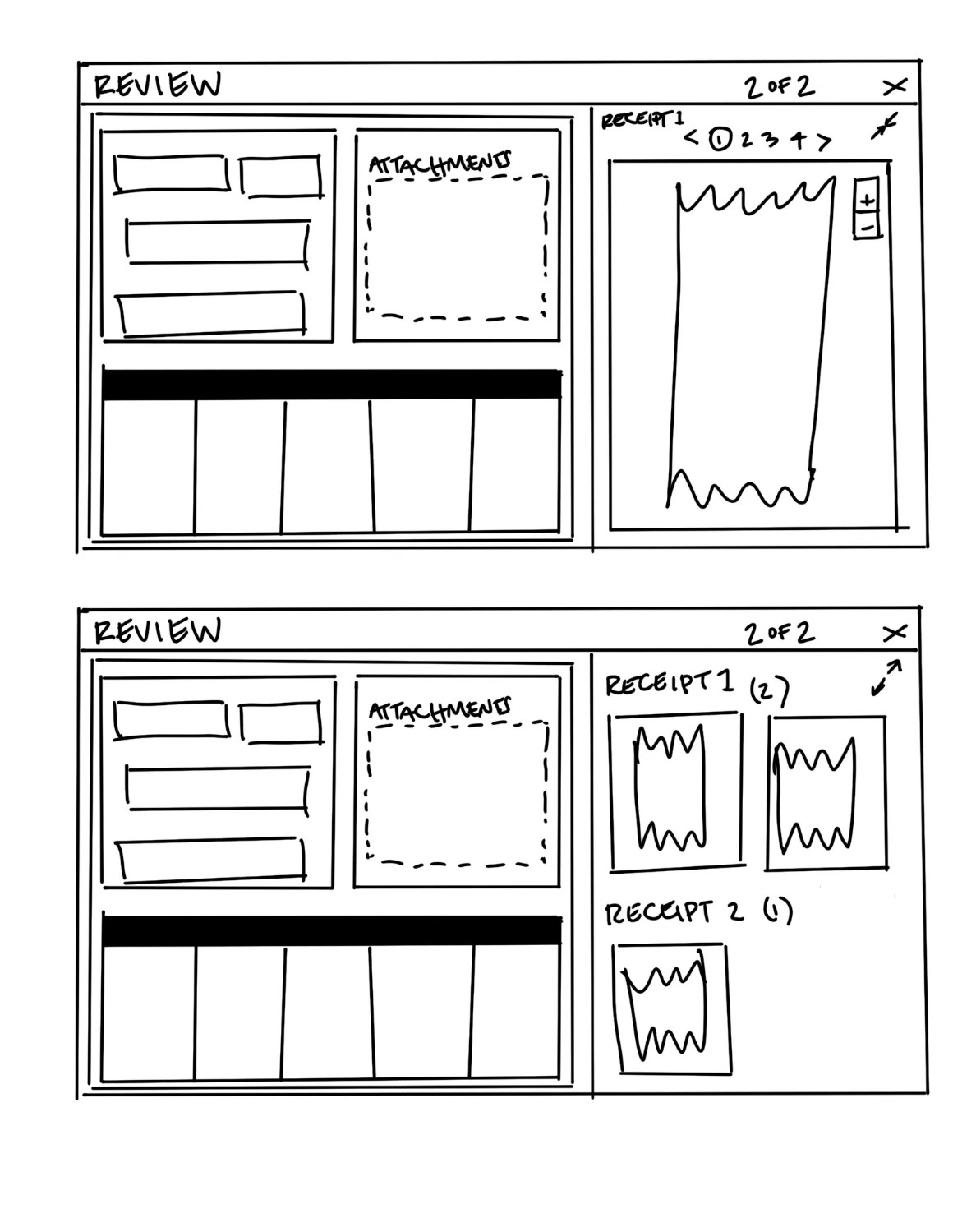
Iteration on this small but crucial step of the experience started with wireframing. Refining this process included screens for a clear flow for capturing and confirming receipt images, the ability to combine multiple images into a single receipt, and lightweight data input to complement AI extraction
Result
A structured, scannable interface that allows users to quickly review, validate, and finalize transactions.
Outcome & Impact
User Impacts

Integrated Tool
This feature eliminates the need for third-party receipt tools. Users get to spend there time elsewhere instead of going through a lengthy manual data transfer process between tools.

speedy workflow
Maintenance technicians and admin users alike are able to get through their receipt review process quickly, saving company time and resources.
Reduced Effort
AI reads, inputs, and interprets information for the user, helping them make decisions and giving them time to focus on other tasks.

Business Impacts

Increased Trust
Tools like this increase users’ trust in the system and promotes product loyalty.

Meaningful AI Integration
Providing AI features that are not just flashy, but actually very useful lets users know you care.
From Manual Entry to AI-Powered Expense Management
Summary
Streamline receipt capture and expense tracking to reduce manual effort and improve accuracy across user roles
Client
Rent Manager (London Computer Systems)
Role
UX Designer
Skills
UX Design
Interaction Design
Cross-Platform Experience Design
The Challenge
Background
Rent Manager is a property management platform that includes accounting tools for tracking company expenses. Users frequently handle high volumes of receipts—from maintenance purchases to team expenses and reimbursements.
Objective
Reduce manual effort in managing company transactions and reimbursements by designing an AI-enhanced receipt processing experience.
Before this feature, receipt management was entirely manual.
Key Problems
- Time-consuming, error-prone data entry
- Inefficient expense tracking workflows
- Lost receipts leading to delayed or missing reimbursements
Opportunity
Create a centralized, intuitive system for capturing, processing, and managing receipts—while leveraging AI to reduce user effort.
Goals
- Introduce a dedicated receipt management feature across web and mobile
- Use AI to extract receipt data and minimize manual input
- Enable fast, accurate transaction processing
- Support multiple user roles with distinct needs
Understanding the Users
To ensure the solution fit into real workflows, I conducted user interviews focused on how receipts are currently handled across roles.
Key Users
Expense Manager
Oversees expenses
Needs
- Clear visibility into transactions
- Confidence in accuracy
- Efficient review workflows
Field Technician
Captures receipts on the go
Needs
- Fast, reliable receipt capture
- Minimal friction while working in the field
- Avoid losing receipts
Administrator
Records transactions
Needs
- Streamlined data entry
- Organized, accessible receipts
- Efficient tools to support multiple team members
Key Insight
Receipt management isn’t just a single task—it’s a multi-step workflow across multiple users. This revealed a specific design need.
The experience had to support both quick capture in the field and efficient processing in the office, without creating extra work at either stage.
Design Approach
I broke the experience into two core workflows:
- Scan & Upload Receipts (Mobile-first)
- Review Receipts & Create Transactions (Web-focused)
This allowed me to design for different contexts while maintaining a connected system.
Designing Receipt Capture (Mobile)
The first challenge was simplifying how users capture receipts in real time. The image capture process we needed to explore had three distinct steps.
Capture single or multiple images
→
Group images into one receipt
→
Decide what to keep, retake, or discard
Iteration on this small but crucial step of the experience started with wireframing. Refining this process included screens for a clear flow for capturing and confirming receipt images, the ability to combine multiple images into a single receipt, and lightweight data input to complement AI extraction
Result
A fast, flexible capture experience that works in real-world conditions (in-store, on the move).
Designing Review & Transaction Creation (Web)
The second phase focused on how receipts are processed and turned into transactions.
There were three main design challenges.
Display of multiple images per receipt
→
Group receipts into one transaction
→
Balance dense information with clarity
I iterated on receipt preview layouts, transaction grouping logic, and data visibility and editability.
Iteration on this small but crucial step of the experience started with wireframing. Refining this process included screens for a clear flow for capturing and confirming receipt images, the ability to combine multiple images into a single receipt, and lightweight data input to complement AI extraction
Result
A structured, scannable interface that allows users to quickly review, validate, and finalize transactions.
Outcome & Impact
User Impacts
Integrated Tool
This feature eliminates the need for third-party receipt tools. Users get to spend there time elsewhere instead of going through a lengthy manual data transfer process between tools.
Reduced Effort
AI reads, inputs, and interprets information for the user, helping them make decisions and giving them time to focus on other tasks.
speedy workflow
Maintenance technicians and admin users alike are able to get through their receipt review process quickly, saving company time and resources.
Business Impacts
Increased Trust
Tools like this increase users’ trust in the system and promotes product loyalty.
Meaningful AI Integration
Providing AI features that are not just flashy, but actually very useful lets users know you care.